 Typerep
Free TestFlight beta iPhone, iOS 17 or later
Log it like a note.Train like a pro.
Type or say bench 135x5x3 @8 and it becomes a logged set. Then Chalk, your coach, tells you the next set, with load and reps worked out by a training engine from your own history. No account, and your log stays on your iPhone.
- One line per exercise
- Next set, with a why
- Works with no network
- Imports Strong, Hevy, FitNotes
Typed line, logged set, next set. Animated example.
How it works
Type it. Get the next set. See it add up.
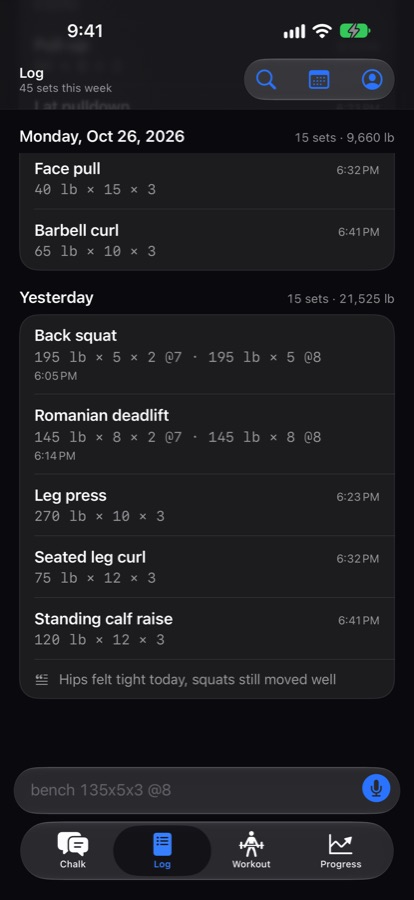
No forms between sets. You write the way you already do in Notes, and the app does the rest.
Write the line
Load, reps and sets in any order, with RPE or RIR, units, bodyweight, drop sets and supersets. Hold the mic and say it instead.
squat 225 5 5
ohp 3x8 95 rir 2
pullups bw x10, x8, x7If a line is unclear, you get a question. A guess is never saved.Chalk picks what is next
Add load, add reps, hold or ease back, with a short “why”. Load, reps, sets, rest and readiness come from a rule-based engine and your history.
Next set: 140 lb × 5Example. Tap Why? to see the reasoning.See what is working
Estimated one-rep max, records, weekly sets per muscle against targets, and trends for every lift, plus pace and totals for cardio.
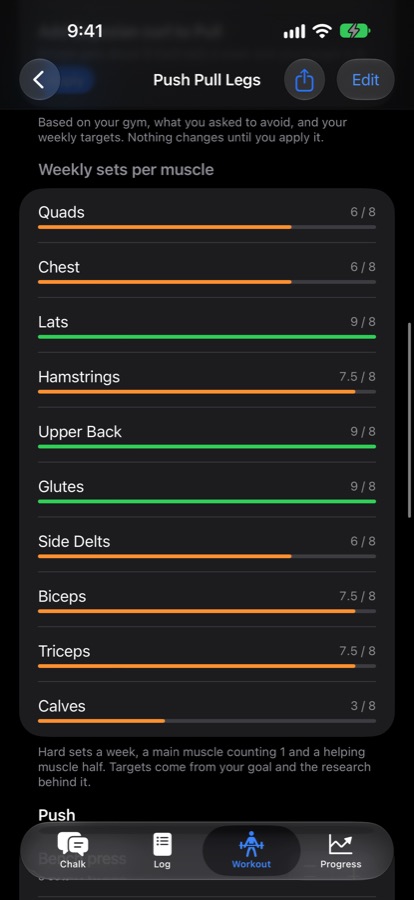
Quads 6 / 8 setsExample weekly target.
Tour
The whole app, screen by screen.
Pick a tab. Every screen below is the app's own, with example data.
One exercise, one suggested set
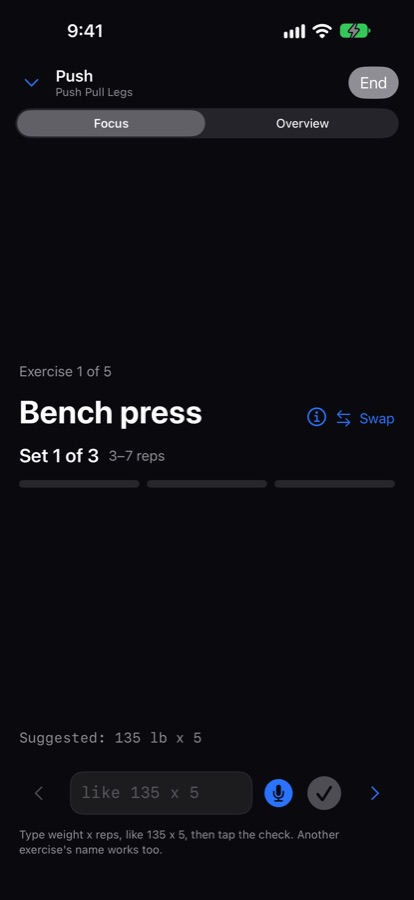
Build a plan with Chalk, copy one from a past session, or write your own. Start it in one tap and run it in Focus mode with sets prefilled.
- Type it or say it, then tap the check. Switch to the overview for the whole session
- Rest timer with a Live Activity on the lock screen, with +30 seconds and Skip
- Equipment taken? Swap the exercise and confirm the card
- Close the app mid-workout and a bar above the tab bar brings you back
- Gyms and machines: suggestions use only what your gym has
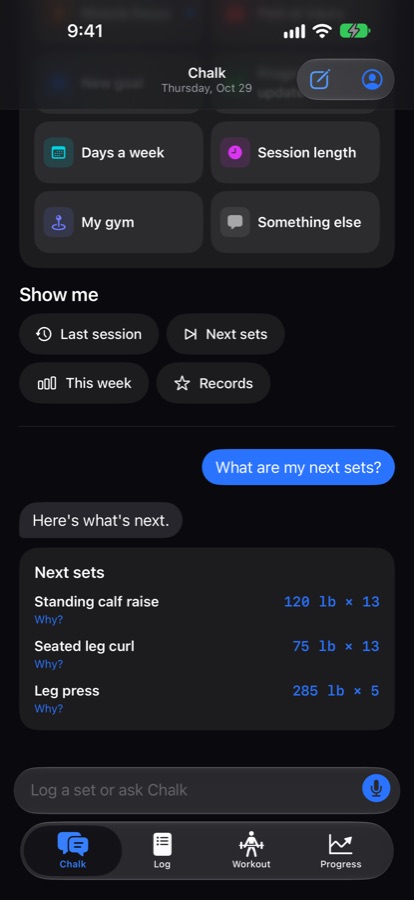
Chalk answers with your numbers, and shows its sources
Ask what to do next, why a lift stalled, or what the week should look like. Every number traces back to a lookup in your own log, and every claim about training science points to a study.
- Checked before you see it. A number that did not come from a lookup is not shown as it is
- Research, graded. A curated base of studies checked against their published abstracts. Each entry is graded established, provisional or convention, with its limits stated
- Careful with pain. Pain, injury and medical questions get a fixed reply that points you to a qualified professional
- Nothing changes until you tap. Logging, plan edits and remembered notes arrive as confirm cards
Chalk runs on the iPhone where Apple's on-device model is available (iOS 26 or later with Apple Intelligence). Otherwise, with your permission, it answers online. Either way the numbers come from the engine.
Plans that fit your gym
A plan with weekly targets per muscle, and suggestions that use only what your gym has.
- Weekly sets per muscle against targets, with the basis for each target
- Gyms and machines: suggestions use only what your gym has
- Start a day in one tap, with sets prefilled
Weekly sets per muscle, against your targets
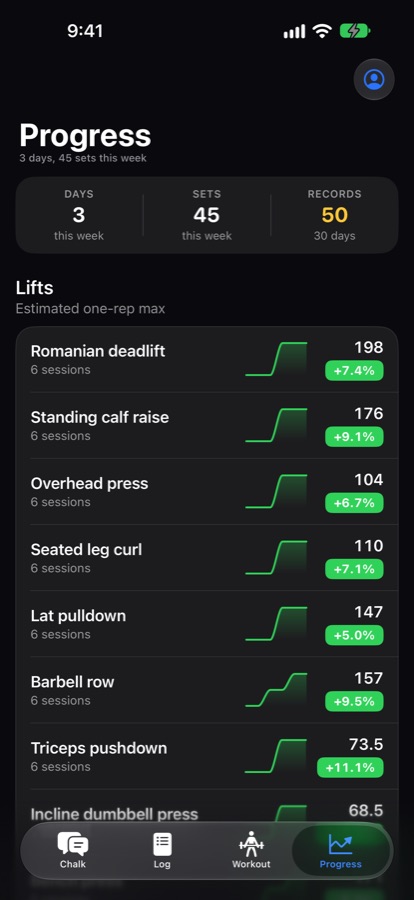
See which muscles got enough work this week, which lifts are climbing, and where your records are. Timed and distance sets sit in the same log, and activity never touches your lifting numbers.
- Body diagram and weekly sets per muscle, with the basis for each target
- Estimated one-rep max, records and trends for every lift
- Runs, rides, rows and classes: type
ran 3 milesor10 min stretching, and pace is worked out for you - A lighter week is suggested when your own history says so. You decide
Share the part that matters
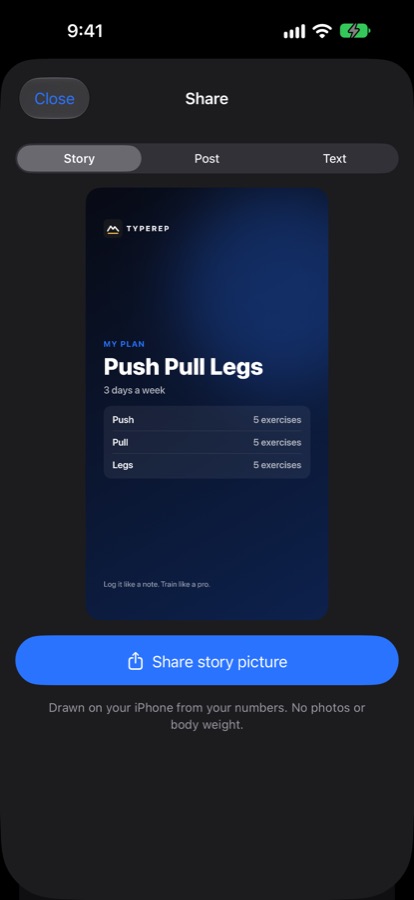
A finished workout, a record or a plan becomes a card drawn on the phone from your own numbers, sized for a Story or a post.
- Story (9:16), Post (4:5) or plain text from one Share button
- Add a short video of the lift, trimmed and cropped in the app, up to 60 seconds for a Story
- Copy a plan as text or as data a friend can paste into Typerep
- No body weight, no Health values and no photos go on a generated card
Everything else
Built around the gym, not around a feed
Widgets, Siri and Shortcuts
Today's workout, this week and your next set on the Home Screen. Start a workout, log a set or open the rest timer from Siri, Spotlight or Shortcuts.
Bring your history
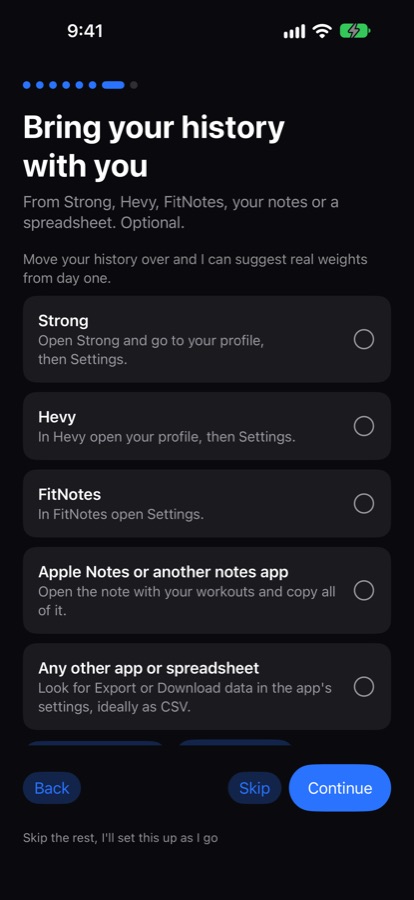
Import Strong, Hevy and FitNotes files or pasted notes. Unclear lines are listed for review, duplicates are counted, and nothing is added until you confirm.
Never trapped
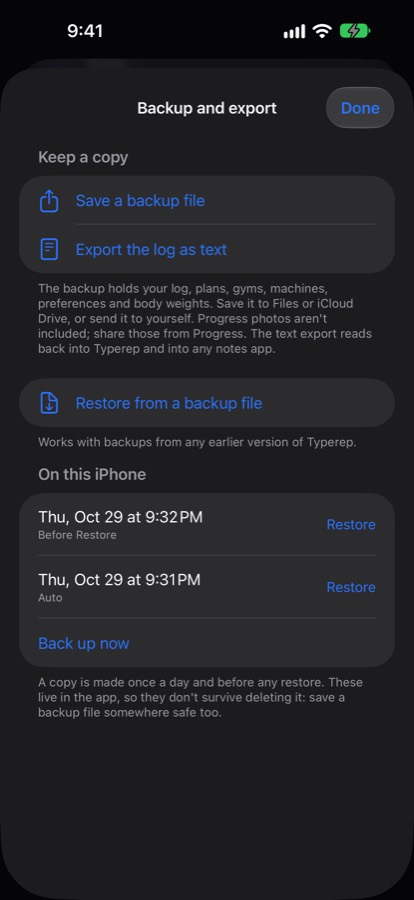
Export plain text, CSV in layouts Strong and Hevy import, or a full backup. Seven automatic daily copies stay in the app.
200+ exercises, plus yours
Cues, common mistakes, muscles and swaps for each. Filter an exercise's history by date, rep range or machine.
iCloud sync optional
Keep your log, plans and gyms in your own private iCloud, so they come back on a new iPhone. Off until you turn it on.
Apple Health, read only on demand
With permission, sleep, HRV and resting heart rate help judge recovery. They are never stored by Typerep, and Health is never written to.
Proof
What we have checked, and what we have not.
These are our own tests and sources, not user results. There are no ratings, reviews or user counts yet, because this is a beta.
- 862typed lines in the parser test set
- 25grounding check cases
- 80test prompts, half about pain
- 60sources in 49 research entries
The typed-line reader
A test set of 862 lines: 584 that must parse exactly and 278 ambiguous ones that must trigger a question instead of a guess. All pass. The lines were written by us, not taken from real logs, so real-world coverage is still being learned.
Numbers are traced
A grounding check rejects any number in a reply that no lookup returned. It is tested on 25 cases, and engine results are covered by hundreds of unit tests.
Pain gets a referral
80 test prompts, 40 about pain or injury and 40 ordinary, all handled correctly: every pain prompt refers out and no ordinary one is blocked. Chalk gives general guidance, not medical advice.
Research with limits
60 sources in 49 entries, checked against PubMed and Crossref abstracts. Where studies disagree, the entry is marked provisional and says so. Full texts are not yet read for every source.
Not done yet: the coach's advice has not been reviewed against real training histories by an experienced lifter. Treat it as a suggestion.
Privacy
What leaves your phone, in one table.
No ads, no tracking, no selling data, no account. Anonymous usage counts with no content in them are on by default and one switch turns them off. The only other thing that can leave is a question to Chalk, and only for the kinds of information you allowed.
| Data | Where it lives | Can it reach an AI model? |
|---|---|---|
| Log, sets, plans, gyms, machines, notes Chalk learned, typed body weights | On your iPhone. In your own private iCloud only if you turn sync on | Only the lookups Chalk runs for a question, and only for categories you allowed |
| Conversations with Chalk | On your iPhone only, in a local file. Never in iCloud | Your messages in the current conversation, only when you ask Chalk something online |
| Apple Health: sleep, HRV, resting heart rate, respiratory rate | Apple Health. Read on demand, never stored by Typerep, never written to | Raw samples never. A summary such as a recovery score only if Chalk and the Health category are on |
| Progress photos | This iPhone only. Not in backups, not in iCloud | Never, to any model, server or sync |
| Location | Used on the phone to match a saved gym | Never |
| Lift videos for sharing | Edited on the phone, deleted when the share sheet closes | Never. No model sees a frame or the audio |
| Pain, injury or medical questions | Answered on the phone with a fixed reply | Never sent over the network |
Seven switches, your call
Workout log, plans, progress and records, body weight, injuries and notes, your own exercises, and Apple Health summaries. Change them in You > Chalk and your data, or turn Chalk off.
The online path, plainly
When Chalk answers online, your phone talks to our small server, which stores nothing, which passes the question to a model provider through OpenRouter. We ask for providers that do not keep or train on prompts. Exactly what is sent.
Logging never needs it
With Chalk off, nothing is read, answered or sent, not even a connection test. Logging, workouts, plans and the engine all keep working.
Compared
How it differs from set-by-set apps and spreadsheets.
Strong and Hevy are good, established apps. A spreadsheet is flexible and free. Here is where Typerep is different, and where it is not ahead.
| Typerep | Set-by-set apps (such as Strong, Hevy) | Spreadsheet | |
|---|---|---|---|
| Logging a set | Type or say one line | Fill weight and reps fields per set | Type into cells |
| Next-set suggestion | Yes, from your history, with a why | Varies by app | You build the formulas |
| Moving data | Imports Strong, Hevy, FitNotes. CSV and backup out | Export and import vary | Anything, by hand |
| Account | None | Often an account | None |
| Platforms | iPhone only, iOS 17 or later | Often iPhone and Android, some with web | Anywhere |
| Maturity | Early beta | Established, with large communities | Always works |
If you want Android, a web app or a social feed, Typerep is not that yet. If you like writing a set as a line and getting a straight answer about the next one, it might be.
Beta
Try it for a week of real training
The beta is on TestFlight. Install it, bring your old log with you, and tell me what it got wrong or what you would miss.
TestFlight for iPhone, iOS 17 or later. Free while in beta. Anything you send to support is read by a person.
What to try first
- Log a set by typing the line
- Ask Chalk for your next set
- Import your old app's export and check the review screen
- Start a workout and run it in Focus mode
FAQ
Questions, answered plainly.
Which iPhones does it run on?
Typerep needs iOS 17 or later. Logging, history, plans, workouts, the rest timer and the training engine work on every supported iPhone with no AI model. Chalk's on-device answers use Apple's model on iOS 26 or later with Apple Intelligence. On other iPhones, Chalk answers online if you allow it.
Does logging work offline?
Yes. The typed line is read on the iPhone, and the log, history, plans, the training engine and the rest timer all run on the phone. You can log a set or run a workout with no network at all.
Do I need an account?
No. There is nothing to sign up for or sign in to. The log lives on your iPhone, and iCloud sync is optional.
What can Chalk see, and can I turn it off?
You choose during setup which of seven kinds of information Chalk may read and send: workout log and history, plans and splits, progress and records, body weight, injuries and notes, your own exercises, and Apple Health summaries. Change any of them, or turn Chalk off, any time in You > Chalk and your data. A kind that is off is never read. With Chalk off, nothing is sent, not even a connection test, and logging, workouts and plans keep working.
What data leaves the phone?
Only what you allow. When Chalk answers online, it sends your message and the results of the lookups it ran, for the kinds of information you switched on. Pasted import text can go the same way. It travels through our server, which stores nothing, to a model provider. Progress photos, location and raw Health samples never leave. iCloud sync, if you turn it on, uses your own private iCloud, which the developer cannot read. The privacy policy lists every item.
How does Chalk know what is true about training?
Numbers come from a rule-based training engine, and a check blocks any number that did not come from a lookup. Explanations draw on a curated research base of studies checked against their published abstracts. Each entry is graded established, provisional or convention, and cites its source. Chalk gives general fitness guidance, not medical advice, and its advice has not yet been reviewed against real training histories.
Does it track cardio and other activities?
Yes. Runs, walks, rides, rows, swims, classes and sports can be logged as timed or distance entries, with pace and weekly totals in Progress. Activities do not change your lifting volume, records or readiness.
How does the import review work?
A Strong, Hevy or FitNotes export, or notes you paste in, is read on the phone first. Lines it can read go into a preview. Lines it cannot read are listed with their original text, and you decide each one. If weights arrive without a unit, you are asked kilograms or pounds once. Nothing is added until you confirm, and duplicates are counted.
Can I export my data?
Yes. Take the log out as plain text, as CSV in layouts Strong and Hevy import, or as a full backup file you can restore later. Nothing is trapped.
Are there widgets and Siri or Shortcuts support?
Yes. Widgets show today's workout, this week and your next set. Shortcuts and Siri can start a workout, log a set or open the rest timer. A set logged this way goes through the same reader as a typed line.
Is it free during the beta?
Yes. The TestFlight beta is free, with no account and nothing to buy. If that changes at launch, you will hear it in the beta notes first, and nothing is charged without a purchase.
How is this different from Strong, Hevy or a spreadsheet?
You log by typing or saying one line instead of filling fields set by set, and a coach picks the next set from your own history with the math done by an engine. Strong and Hevy are established apps with larger communities, and Hevy has social features. Typerep is an early iPhone-only beta with no Android or web version. You can import Strong, Hevy and FitNotes exports and export CSV, so trying it costs you nothing.
Something else? Read the support page or email support@typerep.shadmanrakib.com.